Skip to content
All projects

LiveWorkplace scheduling1-minute read

RoomFlow

Meeting-room booking where availability, approvals and check-in follow one rule set.

Built with
  • PHP 8.3
  • MySQL 8
  • Nginx
  • PWA
  • iCalendar
  • Vanilla JS
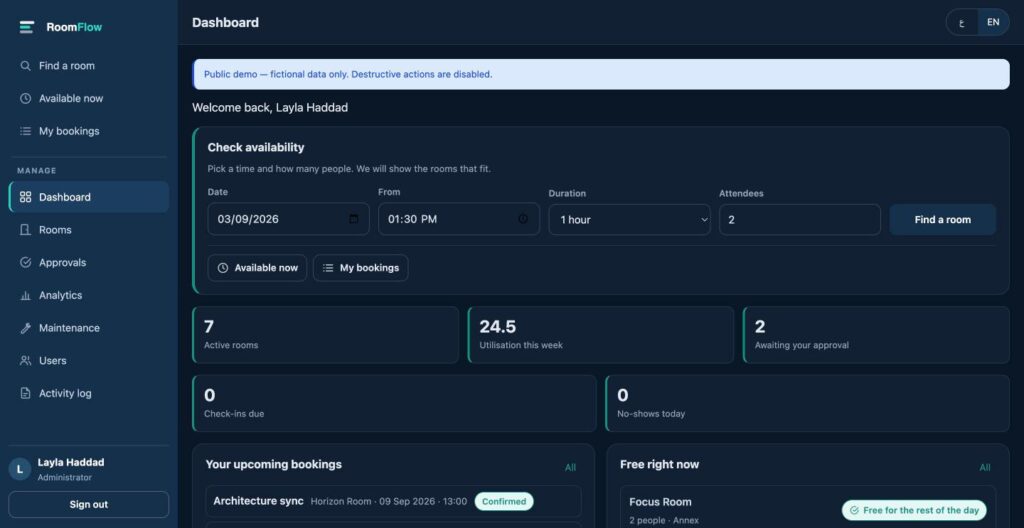
RoomFlow — employee dashboard with the availability check

Problem

Two people book the same room for the same hour, and nobody can say which rooms are actually used.

Solution

A bilingual booking system asks three questions (when, how many people and what the room needs) and returns a shortlist of rooms that fit, each with the reason. Behind it sit a day, week and agenda calendar, approvals, QR check-in and utilisation reports for the people who run the space.

My contribution

Product design and full-stack delivery: decisions, interface, Arabic and English content, implementation, tests, server and deployment.

Key features

  • Overlaps rejected inside a database transaction
  • Automatic release of unused bookings to the waitlist
  • Rooms ranked by fit, with the reason shown
  • Installable web app with calendar export

Outcome

Double bookings are rejected by the database itself, and rooms nobody checks into go back to the waitlist.

Verified by its own test suite, including concurrent booking attempts with no double booking. It is a portfolio demo, so there are no adoption figures.
Technical details and full write-upArchitecture, security, testing and decisions, for readers who want the detail.

Overview

RoomFlow is a bilingual meeting-room booking system. Someone who needs a room answers three questions — when, how many people, and what they need in the room — and gets a shortlist of rooms that actually fit, each one explaining why it was suggested. Behind that simple surface sit a day/week/agenda calendar, approvals, QR check-in, no-show release, a waitlist, maintenance windows and utilisation reporting for the people who run the space.

It runs as a public demo with fictional data. Every account, room, meeting and audit record you see in it was invented for the demo.

The room-booking problem

  • Two people book the same room for the same hour and both believe it is theirs.
  • Finding a free room means opening every room in turn and reading its calendar.
  • A room is booked, nobody turns up, and it stays blocked for an hour.
  • The largest room gets taken for a two-person call because it was the first one free.
  • Nobody can say which rooms are actually used and which are not.

What RoomFlow does about it

  • Overlaps are rejected by the database inside a transaction, not by JavaScript.
  • One form answers 'what is free' across every room at once.
  • A booking nobody checks into is released automatically and offered to the waitlist.
  • Rooms are ranked by how well they fit, and the reason is shown on the card.
  • Utilisation is reported from the bookings themselves.

My role

Everything: product decisions, information architecture, interface and interaction design, the Arabic and English content, the PHP and MySQL implementation, the automated test suite, the server configuration, and the deployment.

Product and UX decisions

The first build was complete and hard to use. Everything a room administrator might ever need sat on the same screens as the one thing an ordinary employee wants. These were the decisions that fixed it.

  • Three actions, not eleven. Find a room, Available now, My bookings sit at the top of the navigation. Every administrative tool moved below a labelled divider.
  • The dashboard asks a question instead of reporting numbers. An employee sees a date, a start time, a duration and a headcount, and a button. Analytics moved below that.
  • Optional inputs are collapsed. Equipment filters and step-free access live under 'More filters', which opens by itself when a filter is already applied.
  • Defaults you can accept. The form opens on the next half hour rather than a fixed 09:00 that is usually already in the past. Nothing is created until the booking is confirmed.
  • Durations are written the way people say them. '1 hour', not '60 minutes'.
  • Plain words instead of system vocabulary. No record ids, no status codes, no database language anywhere a person reads.

The booking journey

Five steps, each asking for only what it needs to ask for.

  1. WhenDate, start time and a duration. Sensible defaults, nothing created yet.
  2. What you needHow many people, and any equipment. Optional filters stay collapsed.
  3. Choose a roomRooms that fit, best match first, each explaining why, with capacity, location, floor, equipment, step-free access and how long it stays free.
  4. Meeting detailsA title, and optionally a purpose, notes or a repeat rule.
  5. ConfirmOne action. The booking is created inside a transaction, or refused with alternatives.
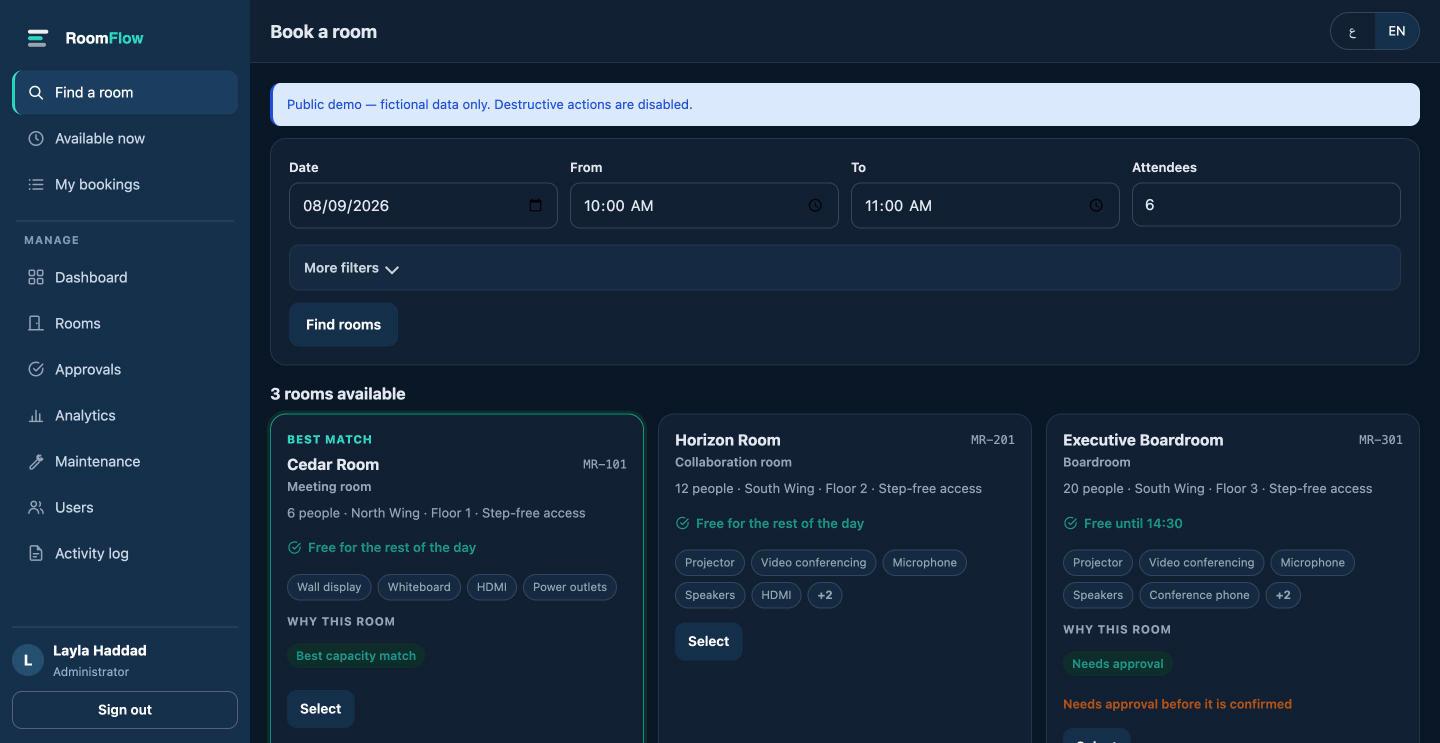
Room results in RoomFlow: Cedar Room flagged Best match, showing type, capacity, wing, floor, step-free access, how long it is free, equipment tags and the reason it was suggested
Every suggestion states its reason. The boardroom shows its approval requirement as a caveat, not a selling point.

The mobile navigation, and why it was invisible

On a phone the menu button was there, correctly sized and correctly labelled — and rendered as an empty box. Two separate faults, either of which alone would have hidden the menu.

  • The icon had no glyph. When the sidebar moved to an inline SVG sprite, the .nav-ic rule lost the solid square that had been standing in for an icon. The menu button still used the old markup — an empty <span> — and no #ic-menu symbol existed. A 44×44 button with a 1px border and nothing inside it.
  • The drawer could not open in Arabic. html[dir="rtl"] .sidebar scores 0,2,1 in CSS specificity; .sidebar.is-open scores 0,2,0. The closed state outranked the open state, so in Arabic — the default language — the panel stayed parked off the right edge even when the button reported it as expanded.

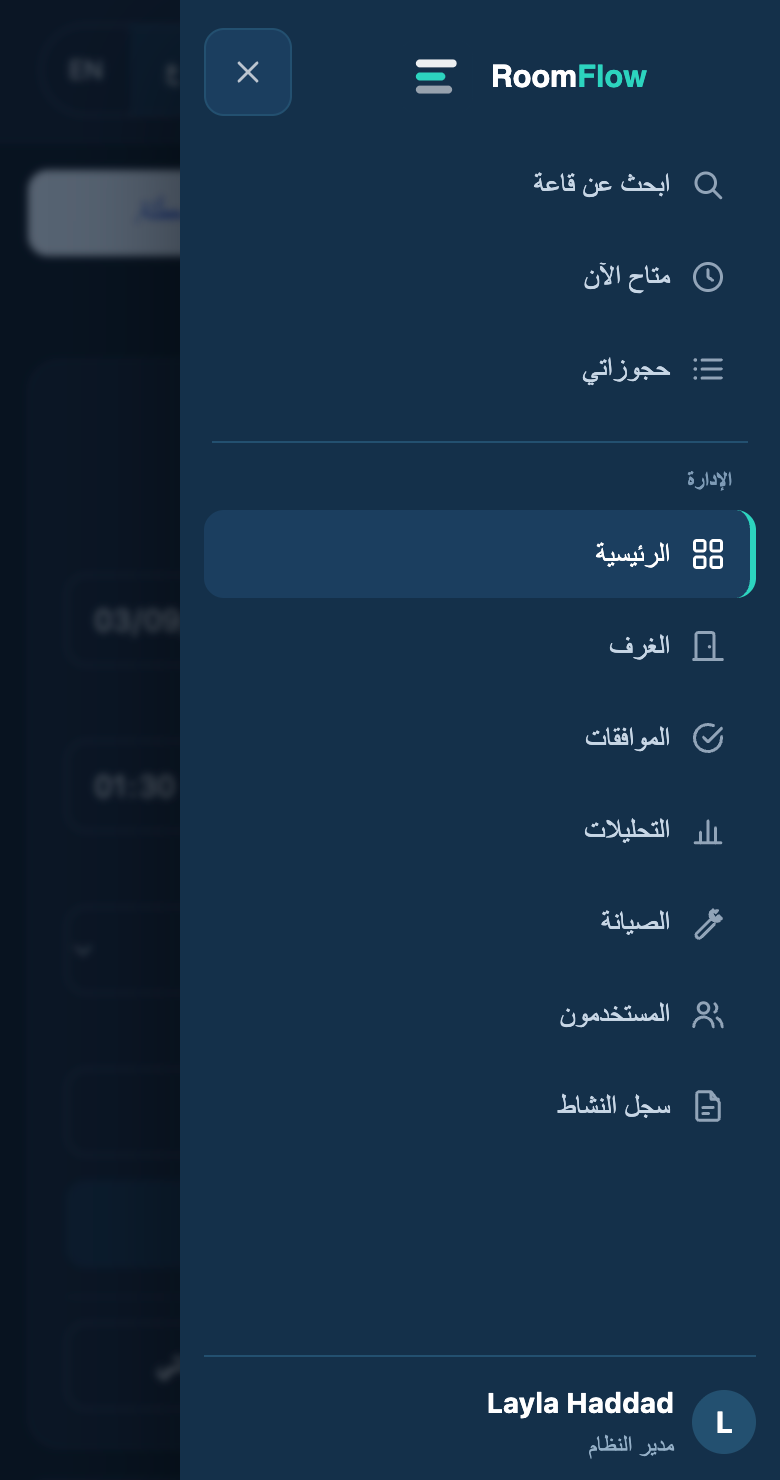
Both are fixed, and the drawer was rebuilt as a proper dialog: it slides in from the edge the button sits on, traps focus while open, closes on Escape, on the backdrop and on its own close button, returns focus to the menu button every time, locks background scrolling, and leaves the tab order entirely when closed.

RoomFlow Arabic mobile navigation drawer open from the right, showing Find a room, Available now and My bookings above a labelled Manage group, with a close button and a dimmed backdrop
The Arabic drawer opens from the right, under the thumb that opened it.

Knowing what is free

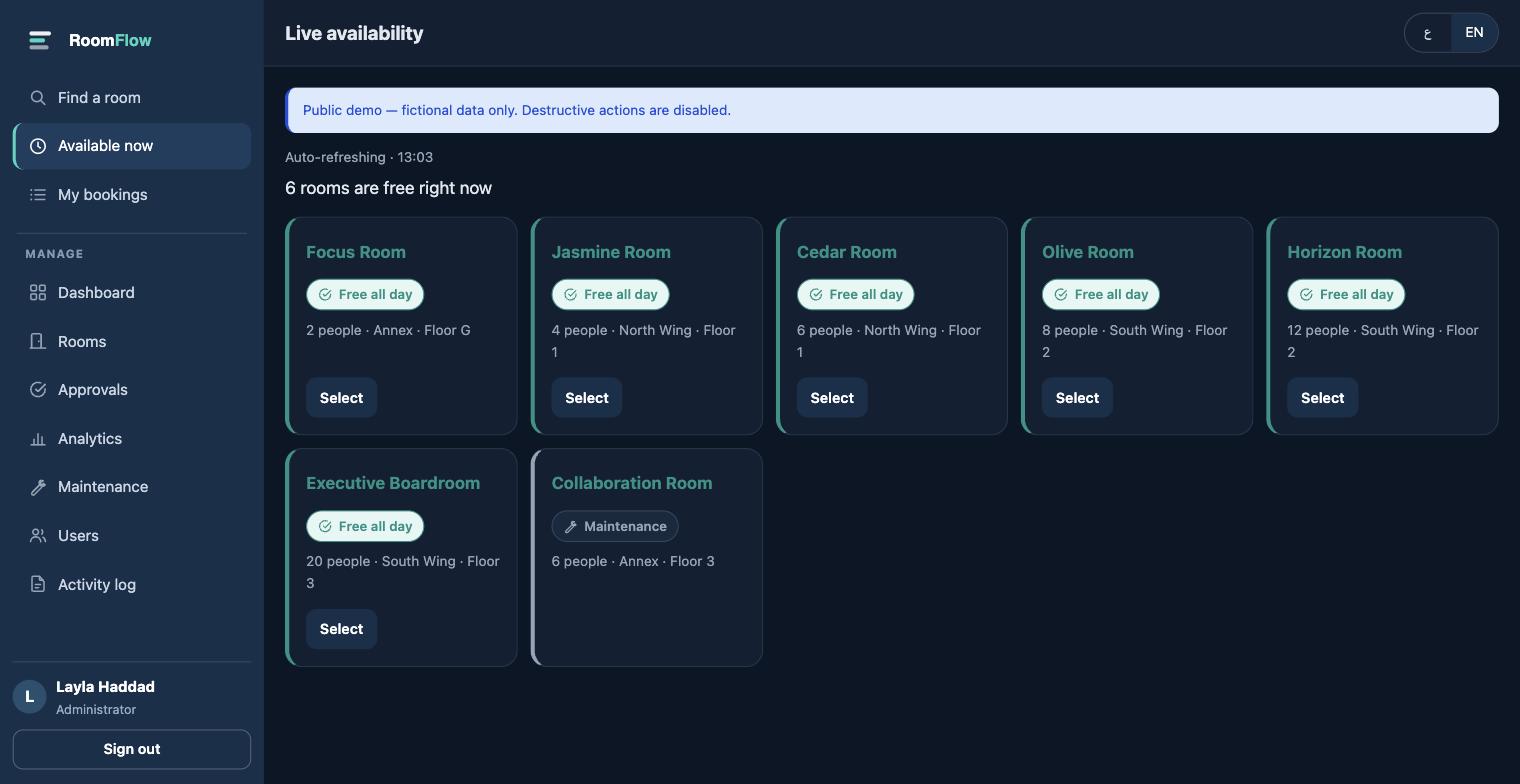
The availability board answers the question without a search. Free rooms sort first, and every room states its condition in words next to an icon — never colour alone, which is unreadable to a colour-blind visitor and to anyone outdoors.

  • Free all day, or free until a specific time
  • Occupied until a specific time
  • Starting soon, with the time it starts
  • Under maintenance

One subtlety cost a bug: a ‘free until 09:00’ label that was quoting tomorrow morning. Every ‘next booking’ lookup is now bounded to the same day, so a time shown to a reader always belongs to the day they are looking at.

RoomFlow live availability board showing seven rooms, free ones first, each with a written status badge such as Free all day, and one room marked Maintenance
Status is written out, with an icon. Colour only reinforces it.

Seeing the whole schedule

Availability answers “is anything free now”. A calendar answers the other question: what does the day actually look like, and where are the gaps. Three presentations, chosen because they are genuinely different jobs rather than one layout at three widths.

  • Day — one column per room, so you can compare rooms at a glance and see which is free at 14:00.
  • Week — one column per day across a working week, for spotting the pattern rather than the moment.
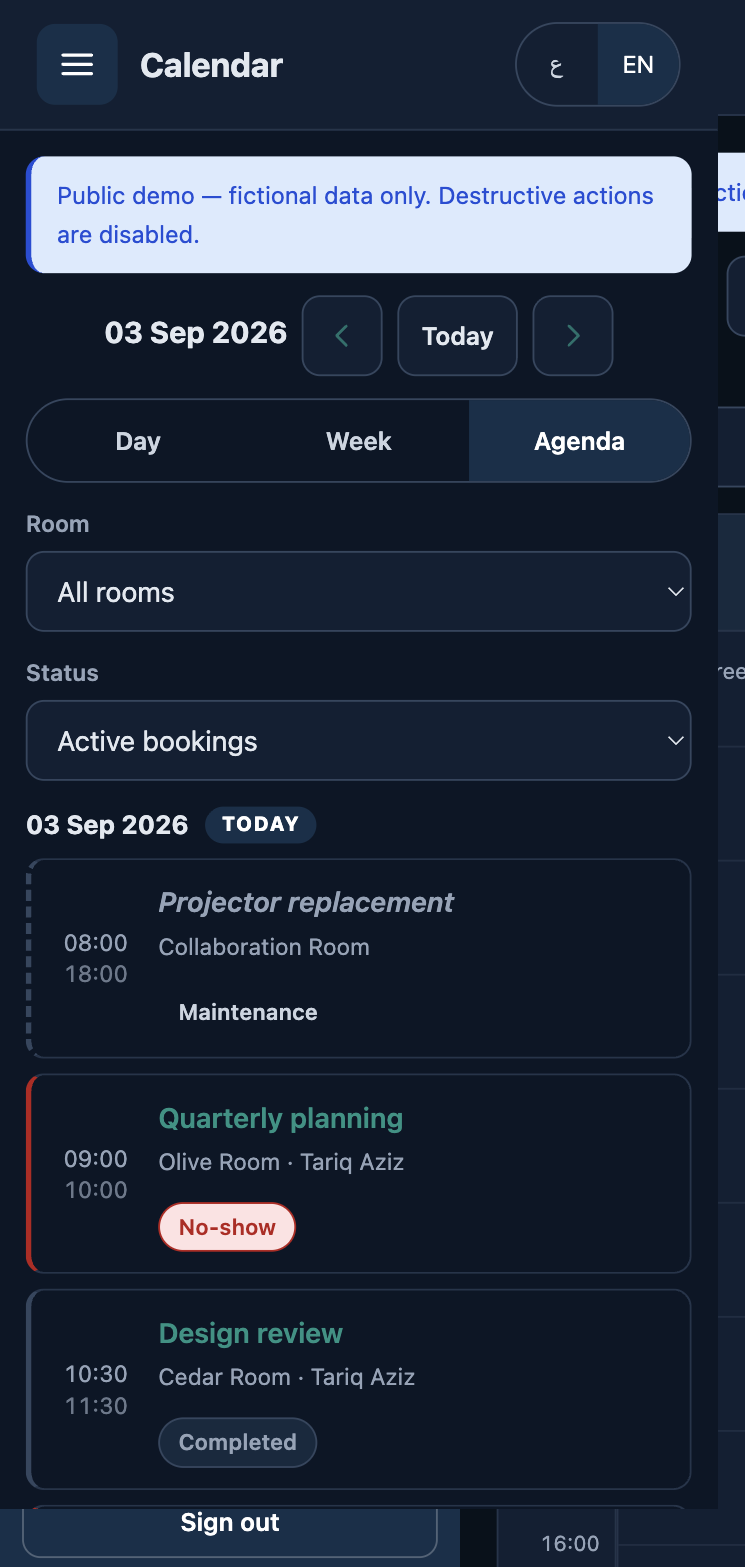
  • Agenda — a list grouped by day, with the free gaps written out when a single room is selected. This is the default on a phone.

Blocks are positioned from their real start and end times, computed on the server, so the grid is correct before any JavaScript runs. Overlapping bookings split into lanes side by side — and the lane count is scoped to each cluster of overlaps, so a booking that clashes with nothing keeps the full column rather than shrinking because two others collided earlier that morning.

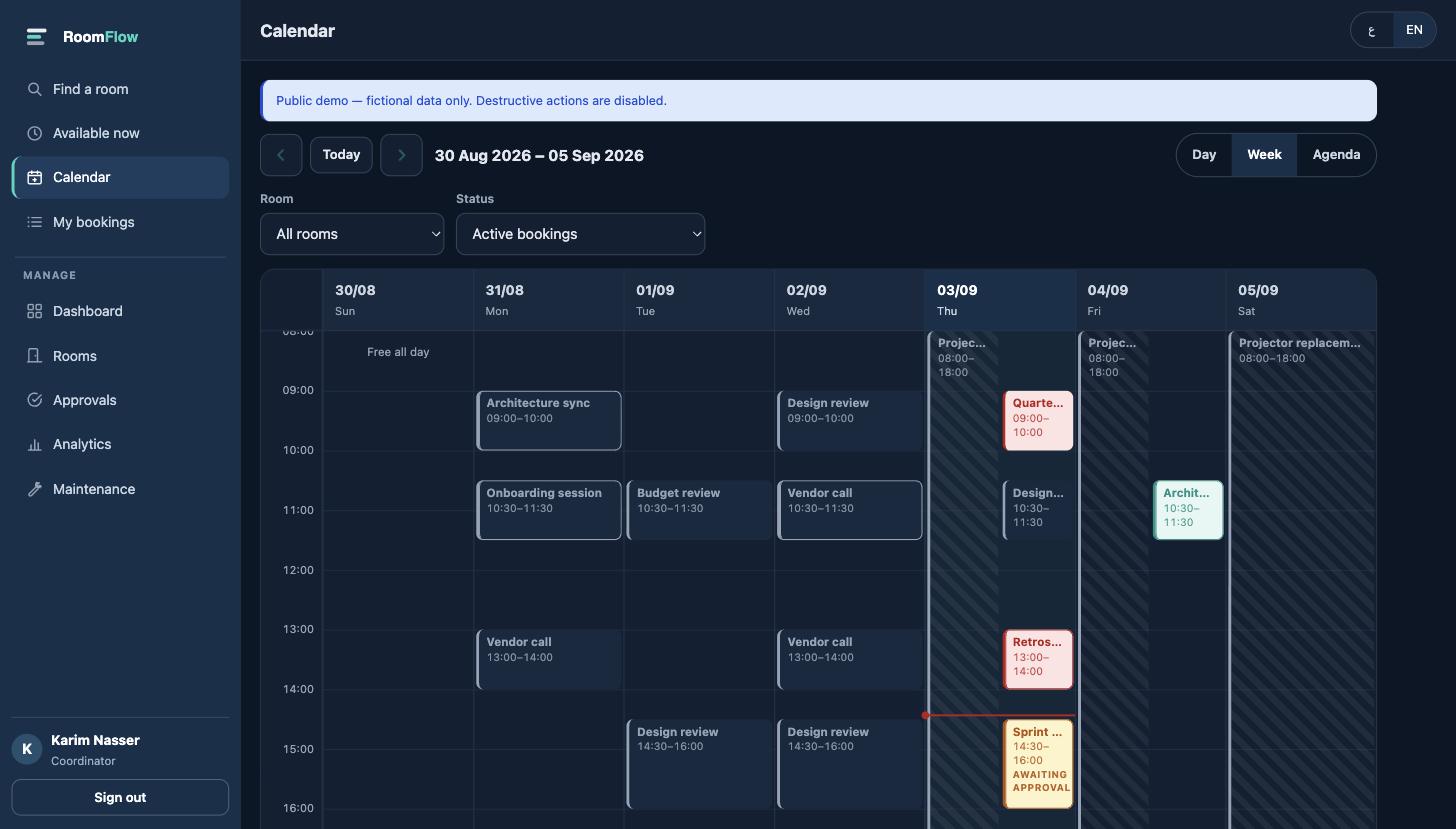
Every state is distinguishable without relying on colour: confirmed, awaiting approval, completed, no-show, cancelled and maintenance each have their own treatment, a legend, and words in the accessible name. A red line marks the current time, and only ever on today.

RoomFlow week calendar: seven day columns, bookings positioned by time, today tinted with a red current-time line, maintenance shown as a hatched block and one booking marked awaiting approval
Week view. Today is tinted, the red line is the current time, and the hatched columns are maintenance.

Occupancy is shared; content is not. An employee can see that a room is taken from 13:00 to 14:00 — otherwise the calendar could not help them find a gap — but another person’s meeting shows only as Busy, with no title, no organiser and no link. A coordinator sees the detail their role requires. The rule is enforced server-side, in the same place that governs opening a booking directly.

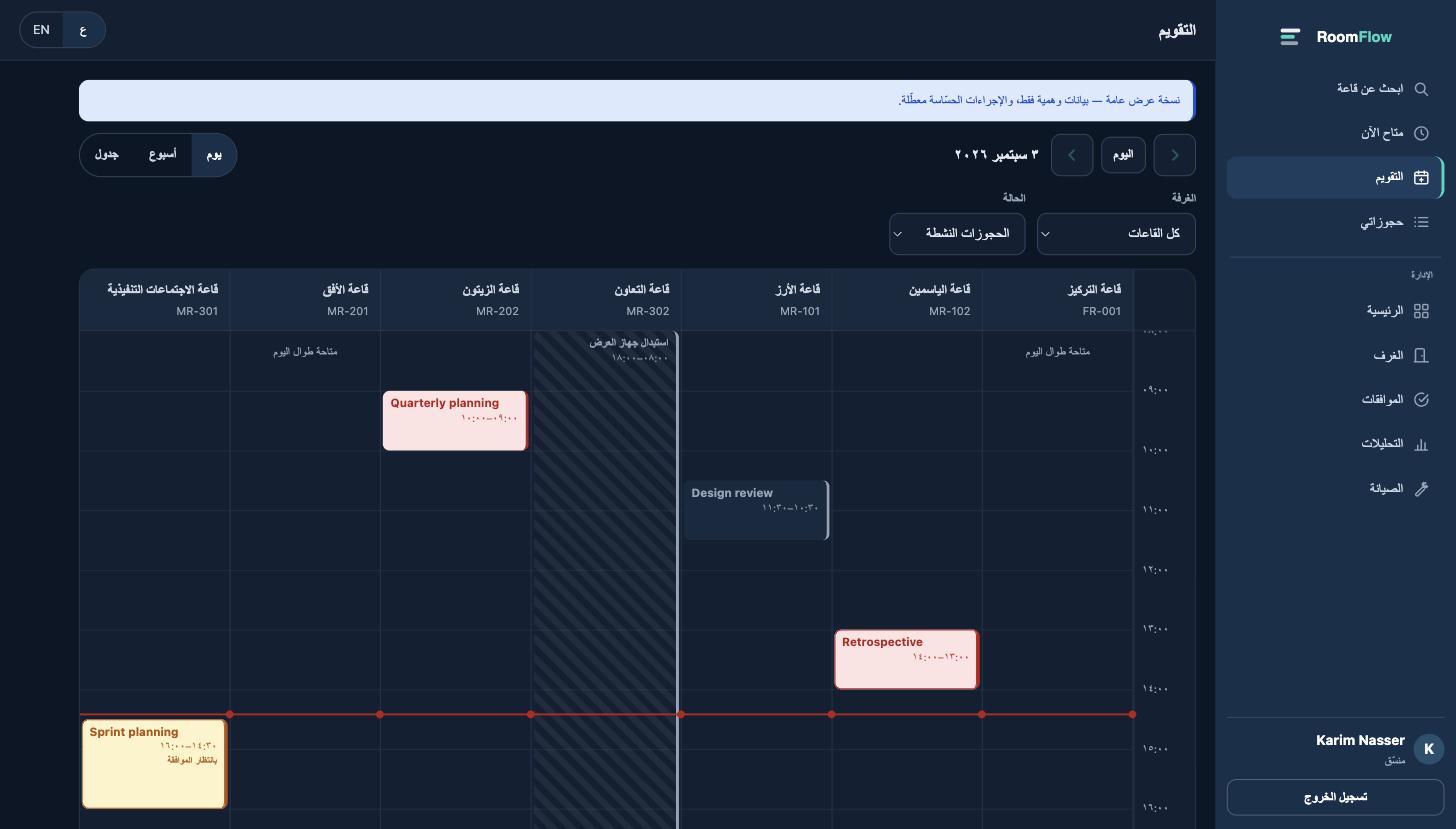
RoomFlow Arabic day calendar, right to left, with a column per room and the current-time indicator across all columns
Day view in Arabic. The grid mirrors; the time axis moves to the right.
RoomFlow mobile agenda listing bookings by day with times, room, organiser and status badges
On a phone the agenda replaces the grid — not the grid squeezed.

Every block is a real link with an accessible name that carries the title, the room, the status and both times — because a coloured bar at a position means nothing to a screen reader. Blocks a viewer may not open are not links at all.

Room information

Rooms follow one naming system so a reader can guess what a room is for before opening it: purpose-named at the small and large ends, neutral names in between. Each room carries an explicit type alongside its code.

RoomArabicTypeSeats
Focus Roomقاعة التركيزFocus room2
Jasmine Roomقاعة الياسمينMeeting room4
Cedar Roomقاعة الأرزMeeting room6
Collaboration Roomقاعة التعاونCollaboration room6
Olive Roomقاعة الزيتونMeeting room8
Horizon Roomقاعة الأفقCollaboration room12
Executive Boardroomقاعة الاجتماعات التنفيذيةBoardroom20

A result card shows name, code, type, capacity, wing, floor, step-free access, how long the room stays free, and its equipment. Anything beyond that lives on the room page rather than crowding the card. All seven rooms are fictional.

Conflict prevention

This is the part that has to be right. Two people pressing Confirm at the same moment must not both get the room, and no amount of client-side validation can guarantee that.

Every booking is created inside a database transaction. The candidate rows are locked with SELECT … FOR UPDATE before the overlap test runs, so a second request queues behind the first rather than reading a stale answer. The overlap test itself is buffer-aware: a room with a 15-minute turnaround rejects a booking that starts 10 minutes after the previous one ends.

newStart < existingEnd + buffer
newEnd   > existingStart - buffer

It is verified by racing twelve real operating-system processes at the same slot, five times over. Exactly one wins each round and the database ends with exactly one row — 60 concurrent attempts, zero double bookings. To prove the test is not vacuous, the same harness was pointed at a naive check-then-insert with no row lock: it produced twelve overlapping bookings out of twelve.

How rooms are ranked

There is no machine learning here and no claim of any. The ranking is a small, deterministic score that a person can read and predict:

  • Capacity efficiency — a room that fits the party with no more than two spare seats scores best, and a room far larger than needed is pushed down.
  • Every requested piece of equipment present.
  • Step-free access when it was asked for.
  • Video conferencing as a mild preference.
  • An approval requirement counts against a room, because it delays confirmation.

The reasons shown on each card are the same values the score was computed from, so the explanation cannot drift from the ranking. Reasons and caveats are separated deliberately: an approval requirement is a cost, and listing it under a heading that reads ‘Why this room’ would sell a drawback as a benefit.

When nothing fits, the same logic produces alternatives — the next free slot in each suitable room — rather than an empty result.

Roles and permissions

Three roles, each with a different first screen. Every route, every controller action and every direct object URL is checked on the server; hiding a link is presentation, not protection.

Employee

Find a room, book it, see and cancel their own bookings, check in by QR. Cannot open anyone else's booking, by URL or otherwise.

Coordinator

Everything an employee can do, plus today's schedule across all rooms, check-ins due, no-shows, approvals and maintenance windows.

Administrator

Everything a coordinator can do, plus users and roles, utilisation reporting and the audit trail.

Approving a booking is a coordinator duty, not a user-administration privilege. That distinction was wrong in an earlier build — coordinators could manage maintenance but not approve anything, which is the one thing the role exists for — and the automated role tests now assert it.

Check-in and no-shows

Each booking carries a 128-bit random check-in token, generated independently of the booking id so it cannot be guessed or walked. The QR code is rendered by a Reed–Solomon encoder written for this project rather than pulled from a third-party service, so no booking data leaves the server to have a code drawn.

  • Check-in opens 15 minutes before the meeting and closes 15 minutes after it starts.
  • Scanning outside that window is refused with the reason, not a generic error.
  • A booking nobody checks into is released automatically and stops holding the room.
  • The freed slot is offered to the longest-waiting person on the waitlist who fits, and the offer expires if it is not taken.
  • A booking that was attended is closed out when it ends, so utilisation separates 'used' from 'booked'.

Keeping a public demo safe

The demo is a real, fully interactive instance. Anyone can sign in and book a room. The guards are about protecting the shared dataset, not about disabling the product.

  • Booking, cancelling your own booking, joining the waitlist and checking in all genuinely work — they are the journey the demo exists to show.
  • Cancelling someone else's booking, cancelling a whole series, toggling users and editing rooms are blocked, and each blocked attempt is written to the audit trail as demo_blocked.
  • The three demo accounts are listed on the sign-in page with a click-to-fill button. It fills the form and stops; nothing is submitted for the visitor, and the password field stays a password field.
  • A nightly job restores the dataset. It runs under its own low-privilege MySQL account that can only read and write this one schema — verified unable to DROP, to reach another database, to create a database, or to grant itself anything — and it holds a lock so two resets cannot interleave.
  • The application's own database credentials are never read by that job.

Arabic and English

Arabic is the default and is a first-class language, not a translation layer. The interface mirrors with CSS logical properties, so the drawer, the navigation, the card layouts and the form grids all flip without a second stylesheet.

  • Arabic-Indic numerals throughout the Arabic interface.
  • Arabic month names, assembled from parts rather than pushed through a format string — an earlier version leaked a placeholder token into every date.
  • Real Arabic plurals, including the dual: غرفة واحدة متاحة for one, غرفتان متاحتان for two, and a different form again above ten. A single ':n rooms' string gets three of those four wrong.
  • An en dash separates inline facts in Arabic instead of a middle dot, because Arabic-Indic zero (٠) is itself a raised dot and the two are indistinguishable at reading size.
  • Both language files are asserted to have matching keys and complete plural families on every test run.
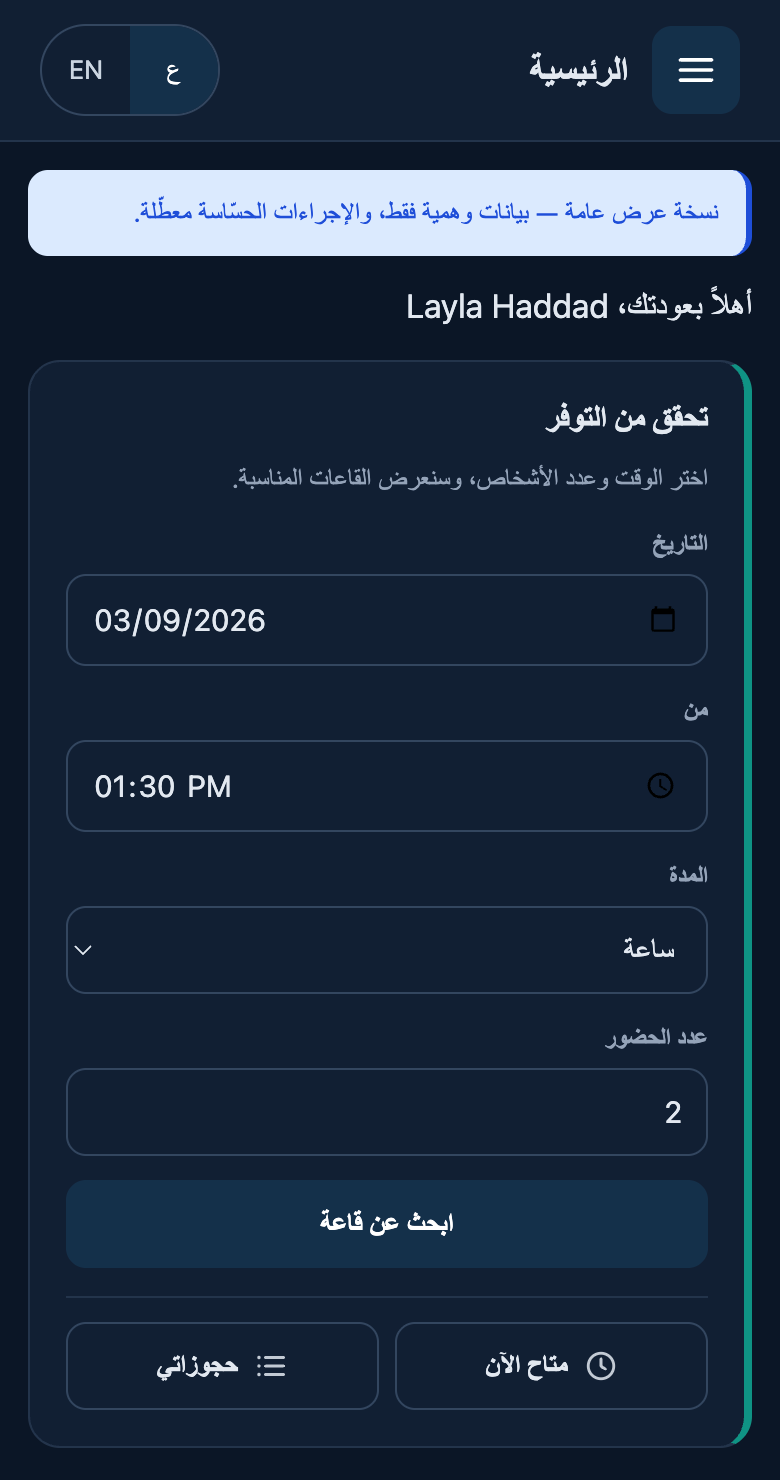
RoomFlow Arabic mobile dashboard, right-to-left, with the menu button top right and the availability form in a single column
Arabic, RTL.
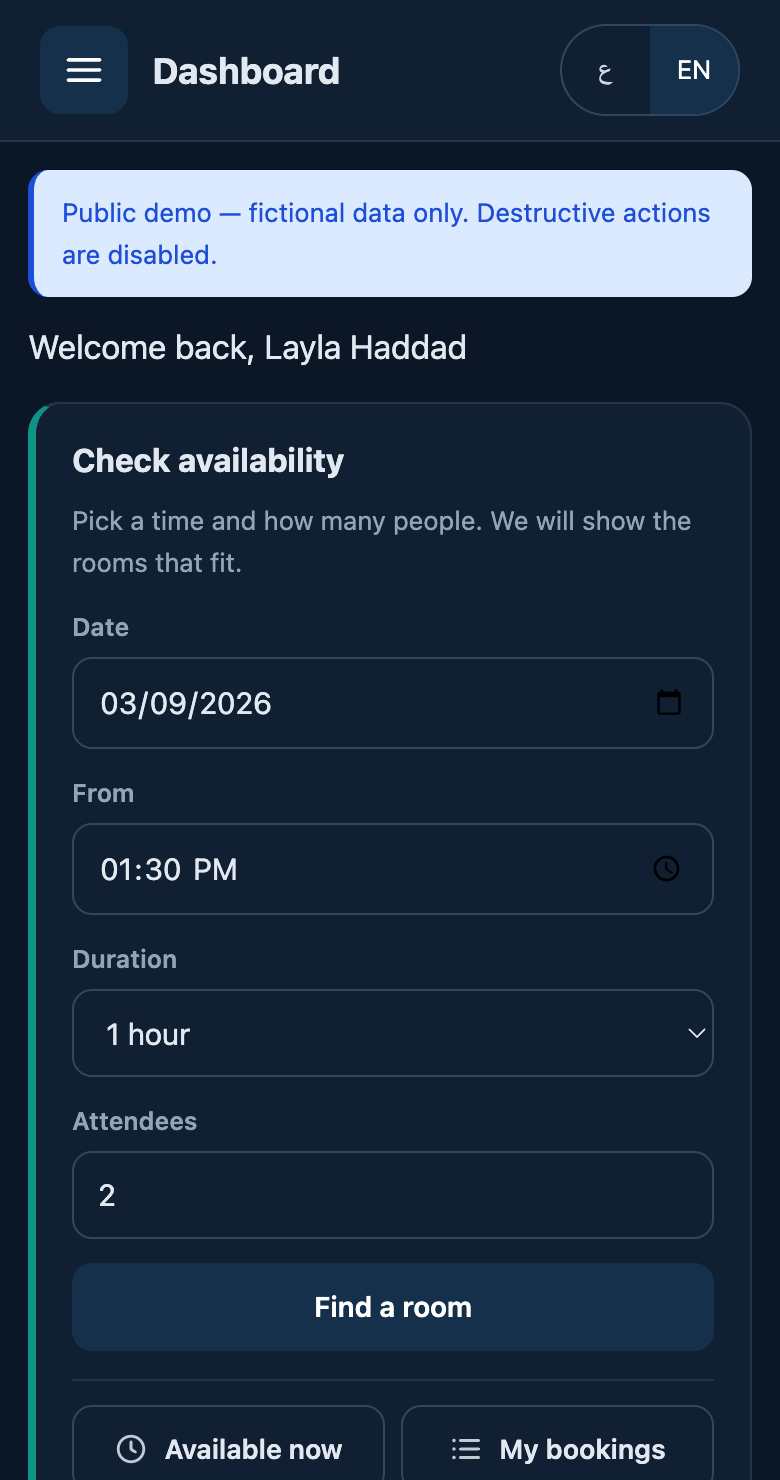
RoomFlow English mobile dashboard, left-to-right, with the menu button top left and the same availability form
English, LTR. Same layout, mirrored.

Accessibility

  • Every interactive control meets 44×44 CSS pixels on a coarse pointer or a viewport up to 900px; denser sizes are used only where a mouse is driving.
  • A single visible focus ring on everything focusable, using :focus-visible so a mouse click does not leave a ring behind.
  • The mobile drawer is a real dialog: focus moves in, is trapped while open, and returns to the menu button on every close path.
  • The closed drawer leaves the tab order entirely, rather than sitting off-screen still focusable.
  • Status is always words plus an icon, never colour alone.
  • A skip link, landmark regions, aria-current on the active navigation item, and labelled form controls throughout.
  • prefers-reduced-motion is honoured — the drawer, the chart bars and the button transitions all stop.
  • Verified at 320, 360, 390, 430, 768, 1024, 1440 and 1920 pixels in both languages: no horizontal overflow and no undersized target anywhere.

Security

  • Every statement is a prepared statement; no string-built SQL anywhere.
  • Output is escaped at the point of rendering, and helper functions that return markup are the exception rather than the rule.
  • CSRF tokens on every state-changing request, verified server-side.
  • Session id regenerated on login; cookies HttpOnly, Secure and SameSite=Lax.
  • Login throttling per email address and per IP, with a lockout that expires rather than sticking.
  • Authorisation checked on every route, controller action and direct object URL — opening another person's booking, or their calendar file, returns 403.
  • Content-Security-Policy, HSTS, X-Content-Type-Options, X-Frame-Options, Referrer-Policy and Permissions-Policy, each sent exactly once.
  • No server version disclosed, and no X-Powered-By.
  • Nothing outside the public directory is reachable over HTTP.
  • The service worker caches the static shell only — never an authenticated page, never a POST, never a per-booking token.

Technical architecture

PHP 8.3 and MySQL 8 with no framework. A front controller with a regex route table, PSR-style autoloading, thin controllers, and the booking rules in one place rather than scattered across views.

  • 14 tables, 10 foreign keys. Rooms, locations, equipment, bookings, series, attendees, waitlist, maintenance windows, notifications, audit log, login attempts, settings, users.
  • One booking engine. Overlap detection, buffers, policy validation, recurrence expansion, ranking and alternative-slot search all live in a single class the controllers call.
  • Timezone pinned per connection. The MySQL session offset is set to the application timezone on connect, so NOW() and PHP's date() cannot disagree — the class of bug that silently breaks conflict windows and lockout expiry.
  • Recurrence bounded by occurrences. Capping the day-walk instead lets a daily rule produce 400 bookings while limiting a weekly one to about 57.
  • Assets versioned by file modification time, so a CSS fix cannot be invisible behind a cache for an hour.
  • RFC 5545 calendar export written directly, with correct octet-based line folding and escaping that a hostile meeting title cannot break out of.

Deployment

  • Its own directory, system user and PHP-FPM pool, with open_basedir confining it.
  • Its own MySQL database and application account, holding only SELECT, INSERT, UPDATE and DELETE on that one schema — cross-database access verified denied.
  • A separate, even more limited account for the nightly demo reset.
  • nginx virtual host with HTTPS, HTTP permanently redirected, and static-asset caching.
  • Configuration validated before every reload; the co-hosted applications on the same server were checked before and after each change and were unaffected.
  • Log rotation, a nightly dataset reset, and a five-minute housekeeping job that releases no-shows and expires stale waitlist offers.

Testing

Six suites run against the deployed application, not a mock of it.

SuiteWhat it coversAssertions
Unit and integrationOverlap and buffer logic, policy validation, approvals, maintenance, recurrence, ranking, alternatives, ICS, QR, bilingual coverage and plurals, timezone agreement, housekeeping143
Concurrency12 real processes racing one slot, 5 rounds60 attempts, 0 double bookings
Live HTTPAuthentication, role enforcement, CSRF, direct object access, security headers, transport, demo guards, navigation contract, availability wording124
CalendarThree views, block positioning, overlap lanes, filters, states, current-time indicator, empty states, keyboard names, role-based privacy, escaping, bilingual56
End-to-end journeySign in, search, select, confirm, view, conflict, export, QR check-in, cancel23
Login throttlingLockout, expiry, isolation between accounts5

Two of those tests exist because they caught me. The concurrency harness was checked against a deliberately unlocked implementation to prove it could detect the failure it claims to prevent. And an assertion that every state-changing action was demo-guarded was passing vacuously — it split methods on public function while the controllers declare public static function, so it never parsed a single method. Rewritten against the route table, it immediately found a real gap.

What was measured

These are figures from the build itself. There are no user numbers, adoption figures or savings claims here, because RoomFlow is a portfolio demo and has none.

  • 351automated assertions passing
  • 60concurrent booking attempts, zero double bookings
  • 236page × width checks with no horizontal overflow
  • 0undersized touch targets at mobile and tablet widths
  • 8viewport widths verified in both languages
  • 14tables, 10 foreign keys

Technology

  • PHP 8.3
  • MySQL 8
  • nginx
  • PHP-FPM
  • No framework
  • Vanilla JavaScript
  • CSS logical properties
  • Progressive Web App
  • Service worker
  • RFC 5545 iCalendar
  • Reed–Solomon QR encoder
  • Let’s Encrypt
  • Bilingual AR / EN